# Voice Agents

{% embed url="https://www.youtube.com/watch?v=gNpagpQSlis" %}
Prefer to watch? See in the video how to create a voice agent (in Portuguese).
{% endembed %}

The **Voice Agent** talks to the user **by voice, in real time**, right in the browser. The user speaks into the microphone, the agent answers out loud, and the conversation works like a phone call: no typing, no waiting for a full written answer. You can **interrupt the agent** by speaking over it, and the transcript appears on screen as you talk.

It is different from the **voice dictation** of the text chat, which only turns your speech into text for you to review and send. With a voice agent, the whole conversation is spoken.

Example uses: customer service, virtual reception, technical support, interview practice and language practice.

{% hint style="info" %}
**What is stored.** Power Omni keeps the **text transcript** and the session data (duration, reason it ended). **Audio is neither recorded nor replayed.** Each conversation is visible only to the user who held it.
{% endhint %}

### Before you start

To create voice agents, check the requirements:

* **New Foundry project.** Voice is not available in projects of the old model.
* **Voice model registered** in **Artifacts > Models** (see [Voice models and rates](voice-agents.md#voice-models-and-rates)).
* **Compatible region.** The availability of the model and voice in your project is confirmed when you **save** the agent.
* **Browser with HTTPS and microphone access.** Whoever uses the agent must allow the microphone when the browser asks.
* **Permission to create.** Administrators, Contributors and [Workspace Owners](../../workspace-owner.md) can create and edit voice agents.

{% hint style="success" %}
**Automatic installation.** When you install Power Omni through **Billing > Settings**, there is an optional **Enable voice conversations** step that already registers a voice model. If the region does not offer voice, the option comes unchecked and the agent is created without voice; an administrator can register the model later, in **Models**.
{% endhint %}

### How to create a voice agent

{% stepper %}
{% step %}
#### Open Agents and click New agent

Go to **Artifacts > Agents**, click **New agent** and choose **Create an agent**.
{% endstep %}

{% step %}
#### Choose the type: Text or Voice

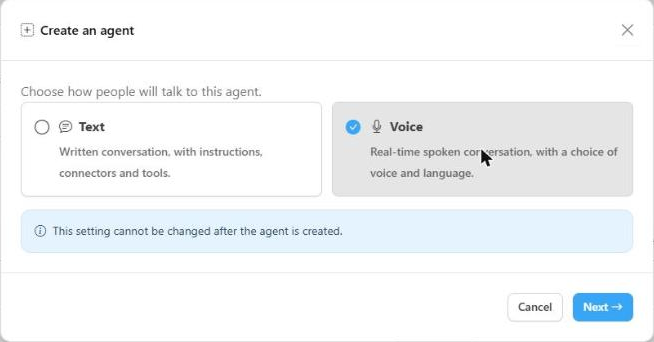
In the **Create an agent** window, choose **Voice** (real-time spoken conversation, with a choice of voice and language) and click **Next**. If you prefer to start from an example, choose **New agent > From an agent template** to open the template gallery.

<figure><img class="only-light" src="../../../.gitbook/assets/agente-voz-novo-agente-light.png" alt=""><img class="only-dark" src="../../../.gitbook/assets/agente-voz-novo-agente-dark.png" alt=""><figcaption></figcaption></figure>

{% hint style="warning" %}
**The type cannot be changed later.** An agent created as **Voice** stays a voice agent (and a **Text** agent stays a text agent). To have both, create two agents.
{% endhint %}
{% endstep %}

{% step %}
#### Choose a starting template (optional)

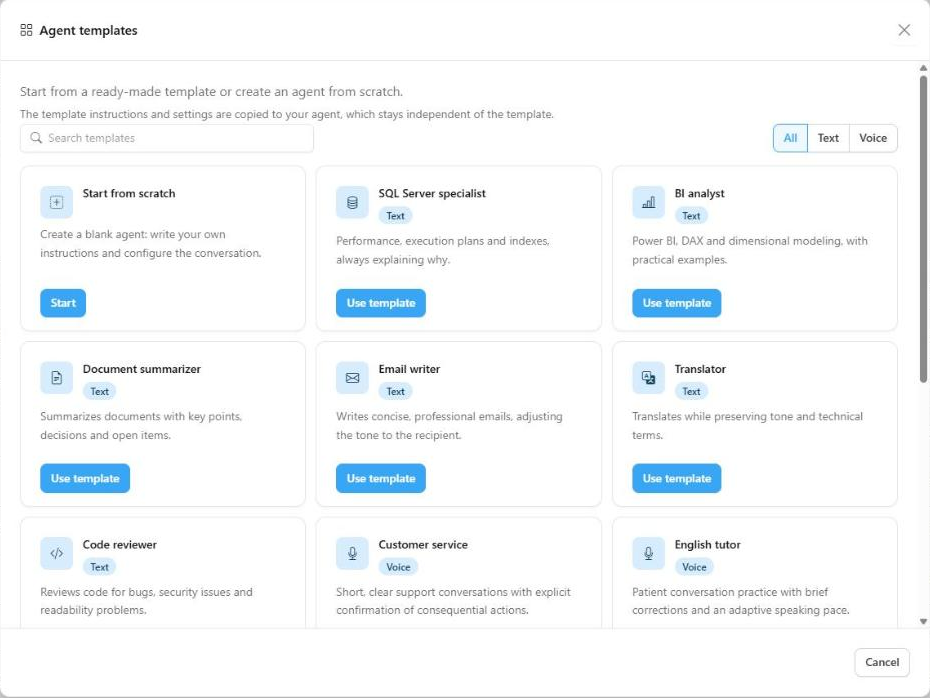
The gallery lists the agent templates, with **search** and an **All / Text / Voice** filter. When you pick a template, its instructions and settings are **copied** to your agent, which stays independent: changing the template later does not change your agent.

<figure><img class="only-light" src="../../../.gitbook/assets/agente-voz-galeria-light.png" alt=""><img class="only-dark" src="../../../.gitbook/assets/agente-voz-galeria-dark.png" alt=""><figcaption></figcaption></figure>

<table><thead><tr><th width="230">Voice template</th><th>What it is for</th></tr></thead><tbody><tr><td><strong>Customer service</strong></td><td>Short, clear support conversations with explicit confirmation of consequential actions.</td></tr><tr><td><strong>Virtual receptionist</strong></td><td>Answers calls, triages, collects name and reason, and routes them.</td></tr><tr><td><strong>Technical support</strong></td><td>Step-by-step diagnosis, confirming understanding at each stage.</td></tr><tr><td><strong>Sales assistant</strong></td><td>Understands the customer's interest and qualifies the lead without overpromising.</td></tr><tr><td><strong>English tutor</strong></td><td>Patient conversation practice with brief corrections and an adaptive speaking pace.</td></tr><tr><td><strong>Interview coach</strong></td><td>Simulates an interview and gives short feedback after each answer.</td></tr><tr><td><strong>General assistant</strong></td><td>A helpful conversational starting point in the user's language.</td></tr><tr><td><strong>Start from scratch</strong></td><td>A blank agent: you write the instructions and configure the conversation.</td></tr></tbody></table>
{% endstep %}

{% step %}
#### Fill in the wizard steps

The wizard has five steps, described below: **Agent and model**, **Conversation settings**, **Connectors and toolboxes**, **Access** and **Review**.
{% endstep %}

{% step %}
#### Review and save

In the last step, check the summary and save. **Saving publishes a new version** of the agent.
{% endstep %}
{% endstepper %}

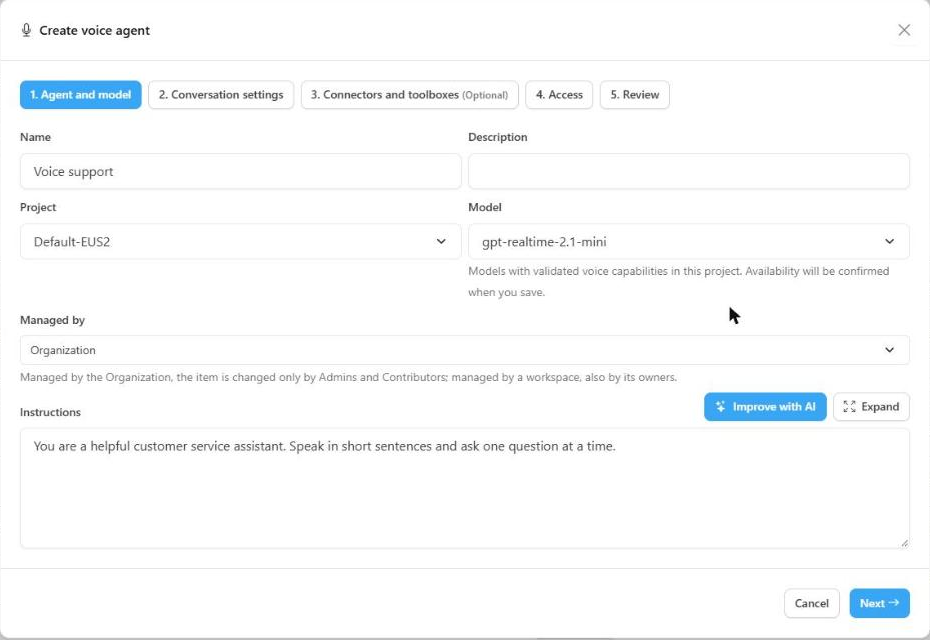
### Step 1: Agent and model

<figure><img class="only-light" src="../../../.gitbook/assets/agente-voz-etapa-agente-light.png" alt=""><img class="only-dark" src="../../../.gitbook/assets/agente-voz-etapa-agente-dark.png" alt=""><figcaption></figcaption></figure>

| Field | Description |
| --- | --- |
| **Name** | How the agent appears to users. |
| **Description** | Optional but recommended: helps users understand what the agent is for. |
| **Project** | Foundry project where the agent will be created (creation only). Choose a New Foundry project. |
| **Model** | Compatible real-time voice model. Models without validated voice in this project are listed as unavailable, with the reason. |
| **Managed by** | Who manages the agent: the **Organization** (only Admins and Contributors can change it) or a workspace (its owners too). See [Workspace Owner](../../workspace-owner.md). |
| **Instructions** | The agent's behavior. For voice, prefer short sentences, one question at a time, and avoid asking the agent to read links, tables or code out loud. |

The **Improve with AI** button rewrites the instructions with spoken conversation in mind (to use it, choose a project first). Review the text before moving on.

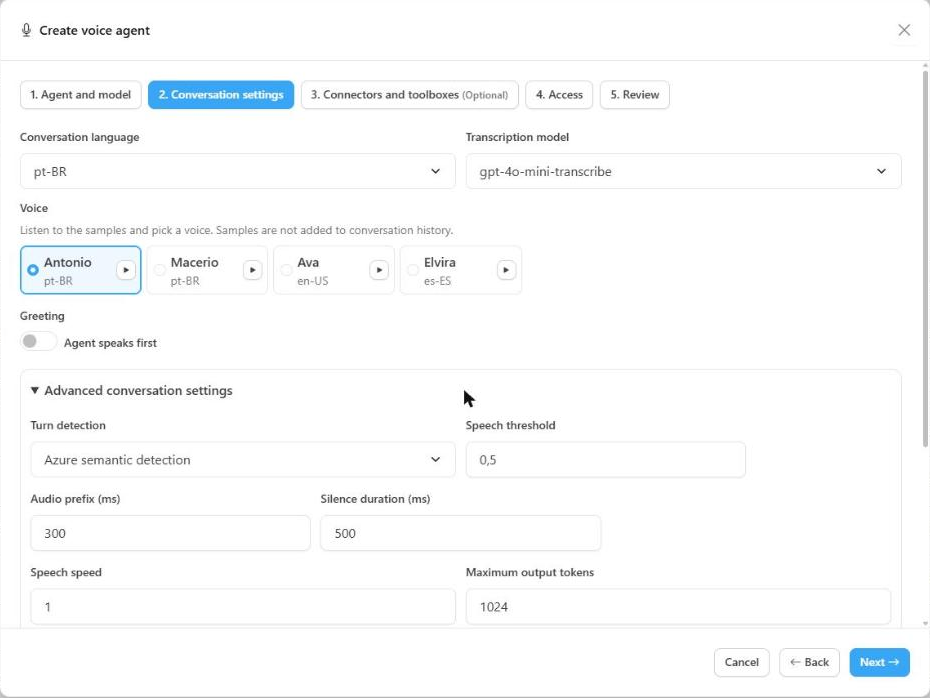
### Step 2: Conversation settings

Here you define how the agent sounds and how the conversation behaves.

<figure><img class="only-light" src="../../../.gitbook/assets/agente-voz-etapa-conversa-light.png" alt=""><img class="only-dark" src="../../../.gitbook/assets/agente-voz-etapa-conversa-dark.png" alt=""><figcaption></figcaption></figure>

* **Voice:** choose among the voices validated for the model. Click **Play a sample** to compare. Samples are pre-recorded audio: they do **not** open a session, do not use the microphone and do not appear in the history.
* **Conversation language:** the language the user speaks. Some models offer **Automatic language detection**.
* **Transcription model:** model that transcribes the user's speech for the history.
* **Greeting:** check **Agent speaks first** so the agent talks first. You can have it **speak an exact text** or **generate the greeting from the instructions**. Some voices cannot speak an exact text; in that case, use the generated greeting or turn the greeting off.

#### Advanced conversation settings


The defaults suit most cases. Adjust only if needed:

| Option | What it does |
| --- | --- |
| **Turn detection** | How the agent notices the user has finished speaking: server voice activity detection, Azure semantic detection or OpenAI semantic detection. |
| **Speech threshold, audio prefix and silence duration** | Sensitivity for detecting the start and end of speech. |
| **Speech speed** | Pace of the agent's voice. |
| **Maximum output tokens** | Limit on the length of each answer. |
| **Recognition hints** | Terms the agent should recognize better (product names, acronyms), one per line. |
| **Noise suppression and echo cancellation** | Improve capture in noisy environments. |
| **Allow interruption by speaking** | When on, the user can interrupt the agent by speaking. |
| **Interim messages** | Short phrases the agent says while waiting for a tool to respond. |
| **Voice temperature** | Variation in intonation, in the models that offer the option. |

### Step 3: Connectors and toolboxes

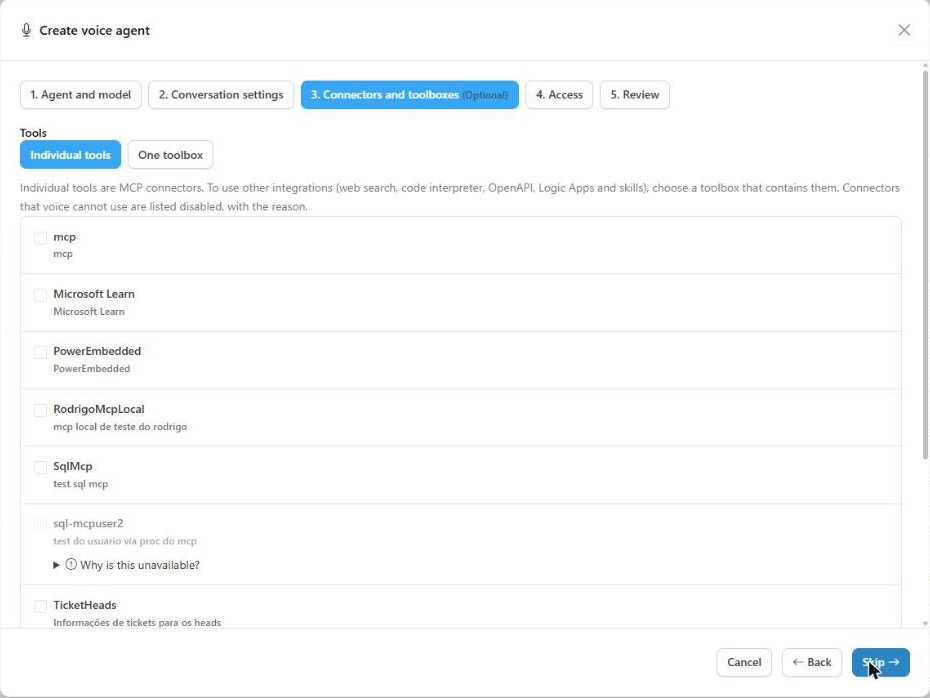
Give the agent tools so it can query systems during the conversation. There are two modes, mutually exclusive:

* **Individual tools:** **MCP** connectors, **up to 20** per agent.
* **One toolbox:** a project [toolbox](../toolboxes.md). This is the way to use **web search, code interpreter, OpenAPI, Logic Apps and skills** in a voice agent.

<figure><img class="only-light" src="../../../.gitbook/assets/agente-voz-etapa-ferramentas-light.png" alt=""><img class="only-dark" src="../../../.gitbook/assets/agente-voz-etapa-ferramentas-dark.png" alt=""><figcaption></figcaption></figure>

Switching mode removes the current selection. If you do not want tools, click **Skip**. Items that voice cannot use are shown **disabled, with the reason**. The main rules:

* Connectors that require **user consent** or that **send the user's email** do not work with voice.
* The MCP connector must have an **HTTPS URL**. Legacy connectors that only have a connection name are not accepted.
* The toolbox must be **published** and contain at least one tool or skill. MCP tools inside the toolbox must not require approval.
* Items **suspended** by management cannot be attached.

{% hint style="warning" %}
**Pinned version.** The voice agent keeps a copy of the connectors and toolboxes in the version it was published with. For this reason, while a voice agent uses a connector or toolbox, **it cannot be edited** and its tools cannot be changed. To change it, edit the voice agent or remove the link.
{% endhint %}

### Step 4: Access

Choose who can use the agent: **users, groups and Workspaces**. You can skip this step and share later through the sharing actions on the agents list. Workspace Owners share only within their own workspaces (see [Workspace Owner](../../workspace-owner.md)).

### Step 5: Review

Check the name, model, voice, language, instructions and access. Use **Edit** on any block to go back to the corresponding step, then click **Save**.


### Editing and versions

Each time you save, Power Omni publishes a **new version** of the voice agent in Foundry.

* **New sessions** use the latest published version.
* **Sessions in progress** keep the settings they started with, even if you edit the agent.
* If someone changed the agent directly in the Foundry portal, Power Omni warns that there is a **newer version in Foundry**. Review it and click **Adopt Foundry version** to bring it in; this replaces the settings shown, including unsaved changes.

Voice agents can be **suspended and reactivated** by management, like other agents. A session in progress ends when the agent, or one of its items, is suspended.

### Voice models and rates

Voice agents use **real-time voice** models (the **gpt-realtime** family, such as `gpt-realtime-2.1` and `gpt-realtime-2.1-mini`, and **azure-realtime**). They are registered in **Artifacts > Models**, like the other models.

* They are **managed service models**: there is no *deployment* or quota in Azure. Billing is by **audio usage**.
* If the voice model does not appear in the **Agent and model** step, an administrator must register it in **Models**.
* In the automatic installation, the **Enable voice conversations** step already registers the model.

### Costs

Since voice is billed by Azure, the cost depends on the **speaking time** and the chosen **model**, and is accounted per agent response.

| What drives the cost | Detail |
| --- | --- |
| **Audio** | User speech (input) and agent speech (output), in audio tokens. This is the largest component. |
| **Text** | Instructions, context and tools also consume text tokens. |
| **Cached context** | Has a reduced rate, when applicable. |
| **Transcription** | Transcribing the user's speech for the history has its own rate, depending on the chosen transcription model. |

Reference values (public Azure pricing, per 1 million tokens, in USD):

| Model | Audio input | Audio output | Text input | Text output |
| --- | --- | --- | --- | --- |
| `gpt-realtime-2.1` | 32 | 31 | 4 | 24 |
| `gpt-realtime-2.1-mini` | 11 | 26 | 0.66 | 2.64 |

As a reference, an audio-only estimate (300 input tokens and 600 output tokens per minute of conversation) is around **US$ 0.03 per minute** with `gpt-realtime-2.1` and **US$ 0.02 per minute** with `gpt-realtime-2.1-mini`.

{% hint style="warning" %}
**These are estimates.** The values above follow Microsoft's public price table and **do not replace the Azure invoice**. The actual cost varies with the size of the instructions, tool usage and the pace of the conversation. To track real spending, use [Monitoring](../../monitoring.md) and set a [Budget](../../budget.md).
{% endhint %}

Tips to control cost:

* Prefer the **mini** model for simple, high-volume support.
* Keep **instructions short** and connect only the necessary tools.
* Reduce the **maximum duration** and **inactivity timeout** of sessions (see the next section).
* Set **budgets** per agent, group or organization.

### Voice session limits

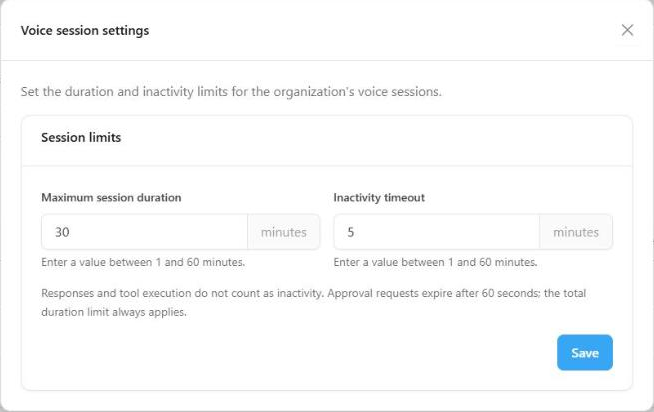
In **Artifacts > Agents**, the **Voice sessions** button opens the **Voice session settings**, where the administrator sets the session limits for the whole organization. Enter a value between **1 and 60 minutes**.

<figure><img class="only-light" src="../../../.gitbook/assets/agente-voz-sessoes-light.png" alt=""><img class="only-dark" src="../../../.gitbook/assets/agente-voz-sessoes-dark.png" alt=""><figcaption></figcaption></figure>

| Limit | Default | Description |
| --- | --- | --- |
| **Maximum session duration** | 30 minutes | The session ends when this time is reached. |
| **Inactivity timeout** | 5 minutes | The session ends if nobody speaks. Time spent with the agent answering or running a tool does **not** count as inactivity. |

Inactivity cannot be greater than the maximum duration. Besides these limits, the session also ends when:

* the available **budget** is exhausted;
* the user's **access** to the agent is revoked, or the license is no longer valid;
* the agent or one of its items is **suspended**, or a component of the version is removed;
* the user **ends** it, leaves the voice panel or the connection is interrupted.

### Monitoring and budget

In **Monitoring**, voice cost and requests appear **separately from text**:

* **Total Questions:** shows the count of text questions and, below it, **+ N voice responses**.
* **Average Cost / Question:** considers **text conversations only**.
* **Total Cost:** breaks down **Text** and **Voice** (for example, "Text $12.21 · Voice $0.01").
* In the usage tables, rows for agents, users and models that had voice carry an extra **Voice** line with the matching amount.

Voice consumption also counts toward [Budgets](../../budget.md), which are checked during the conversation.

<figure><img class="only-light" src="../../../.gitbook/assets/agente-voz-monitoramento-light.png" alt=""><img class="only-dark" src="../../../.gitbook/assets/agente-voz-monitoramento-dark.png" alt=""><figcaption></figcaption></figure>

{% hint style="info" %}
**Unreconciled consumption.** Until Microsoft confirms that the audio usage report is complete, the session accrues the components the service reported and marks the consumption as **unreconciled**. Nothing is estimated or recorded as zero. In case of a discrepancy, the **Azure invoice** is the reference.
{% endhint %}

### Best practices

* Write instructions for **spoken conversation**: short sentences, one question at a time, confirmation of names and numbers.
* Ask the agent to **confirm before consequential actions** and never to say it finished something before the tool responds.
* Choose the voice by **listening to the samples** and the language your users really speak.
* **Test** the agent with the microphone and browser users will use.
* Enable only the necessary **connectors** and prefer toolboxes for integrations such as web search.
* Set **session limits** and a **budget** before releasing to many users.

### Limitations

* There is no **audio** recording or replay; the history is text only.
* Each user can have **one active voice session at a time** in the organization.
* An interrupted connection is **not resumed**: the user starts a new session, with fresh context.
* Voice requires **HTTPS** and a browser with microphone and AudioWorklet support.
* Connectors that depend on the user's identity (consent, sending email) do not work with voice.

To see how end users talk to the agent, see [Voice Conversations](../../../user-portal/voice-conversations.md).

### Need help?

{% hint style="info" %}
<mark style="color:$primary;">If you have questions about voice agents, models, cost or session limits, contact Power Omni support.</mark>
{% endhint %}