# Token Consumption

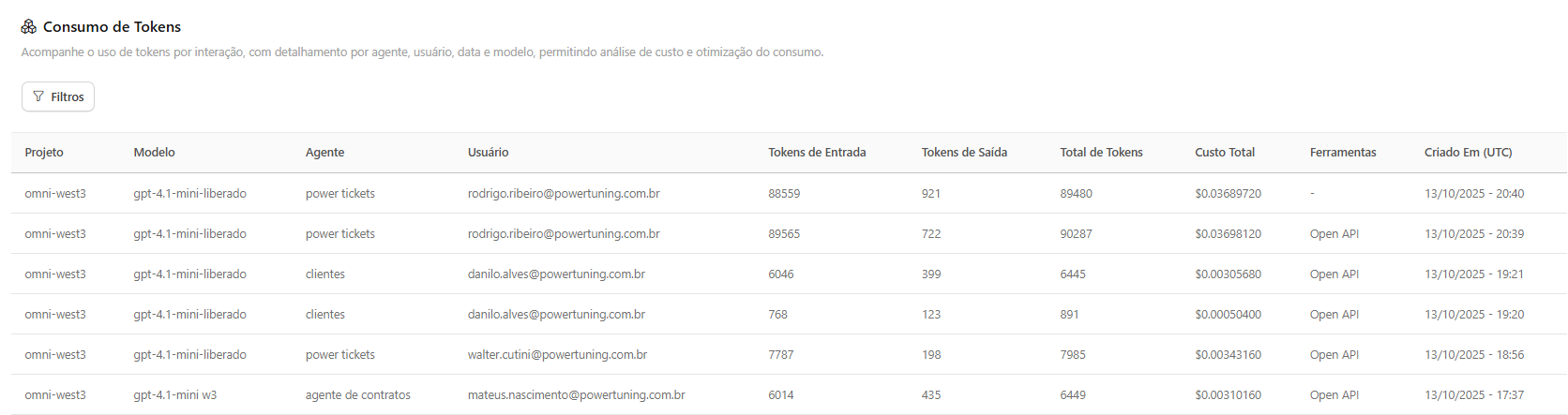
The **Token Consumption** menu is your data source for detailed auditing, presenting a transactional log of each AI interaction. It allows the administrator to track token costs per question, ensuring full transparency in the consumption of your Azure account.

<figure><img src="/files/6yMdiHbWJWTlY9CBiqOd" alt=""><figcaption></figcaption></figure>

Purpose

* **Financial Audit:** Identify exactly where the cost is being generated.
* **Cost Optimization:** Analyze consumption by Model and Agent to make decisions about choosing the most efficient model for each function.
* **Governance:** Link each interaction to a specific user and project.

### Table Details

The log table displays the following fields for each transaction (question/response):

<table><thead><tr><th width="207">Field</th><th>Description</th></tr></thead><tbody><tr><td>Project</td><td>The Azure resource that generated the consumption.</td></tr><tr><td>Model</td><td>The specific AI model used in the interaction.</td></tr><tr><td>Agent</td><td>The AI assistant used by the user.</td></tr><tr><td>User</td><td>The user who initiated the interaction.</td></tr><tr><td>Input Tokens</td><td>The number of tokens used in the user’s prompt.</td></tr><tr><td>Output Tokens</td><td>The number of tokens used to generate the AI response.</td></tr><tr><td>Total Cost</td><td>The financial cost of the specific interaction in US dollars (USD).</td></tr></tbody></table>


---

# Agent Instructions: Querying This Documentation

If you need additional information that is not directly available in this page, you can query the documentation dynamically by asking a question.

Perform an HTTP GET request on the current page URL with the `ask` query parameter:

```
GET https://docs.poweromni.ai/en/administration-and-configuration/audits/token-consumption.md?ask=<question>
```

The question should be specific, self-contained, and written in natural language.
The response will contain a direct answer to the question and relevant excerpts and sources from the documentation.

Use this mechanism when the answer is not explicitly present in the current page, you need clarification or additional context, or you want to retrieve related documentation sections.
