> For the complete documentation index, see [llms.txt](https://docs.poweromni.ai/llms.txt). Markdown versions of documentation pages are available by appending `.md` to page URLs; this page is available as [Markdown](https://docs.poweromni.ai/en/administration-and-configuration/groups.md).
# Groups
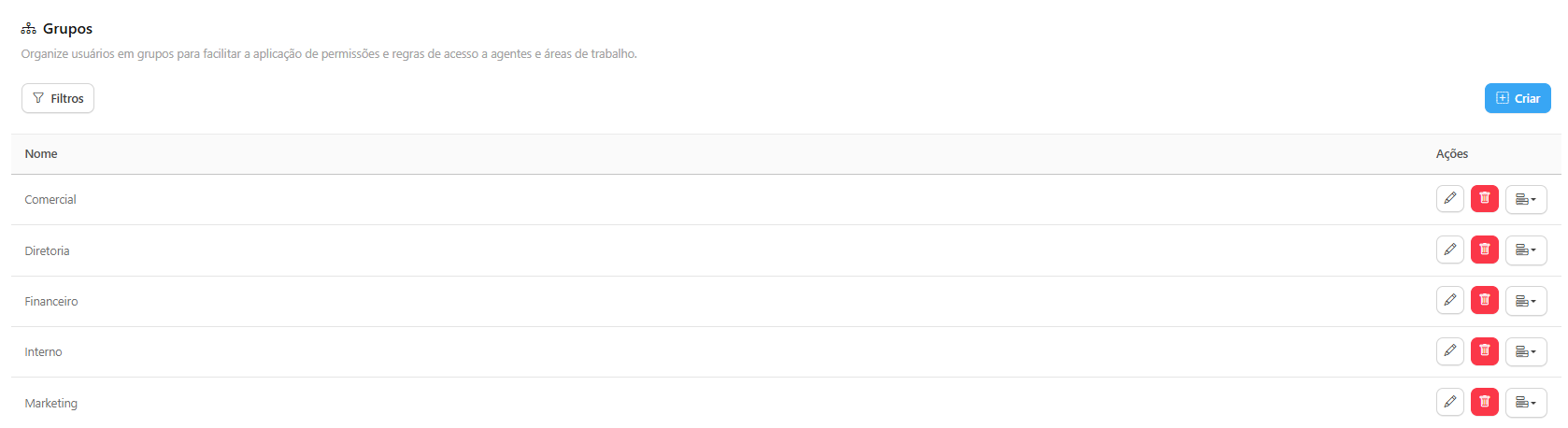
The **Groups** menu is the essential tool for organizing your users and simplifying the application of access rules to Agents and Workspaces. Instead of managing permissions per individual user, you manage them by Group.
#### Overview
The main table displays all Groups registered in your organization (Ex: Sales, Executive Board, Finance, HR).
#### How to Create and Manage a Group
#### 1. Creating a New Group
* Click the **Create** button in the upper-right corner.
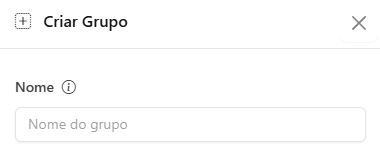
* Define the **Group Name** (Ex: Marketing, Admin, Finance).
#### 2. Managing Relationships (Permissions)
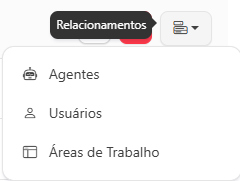
By clicking the actions button (...) next to a Group, you access the **Relationships** menu. This is the fundamental step to assign the Group’s permissions:
* **Users:** Link the Users in your organization to this Group. All Group members will inherit the same access permissions.
* **Agents:** Define which Agents (AI assistants) the members of this Group will have permission to view and interact with in the chat portal.
* **Workspaces:** Define which Workspaces (logical organization) the Group can access.
{% hint style="info" %}
### Importance of Hierarchy
Security in Power Omni is based on: **User → Belongs to a GROUP → Has access to AGENTS and Workspaces.**
Using Groups simplifies compliance and makes auditing easier in the **View Permissions** section.
{% endhint %}