Support
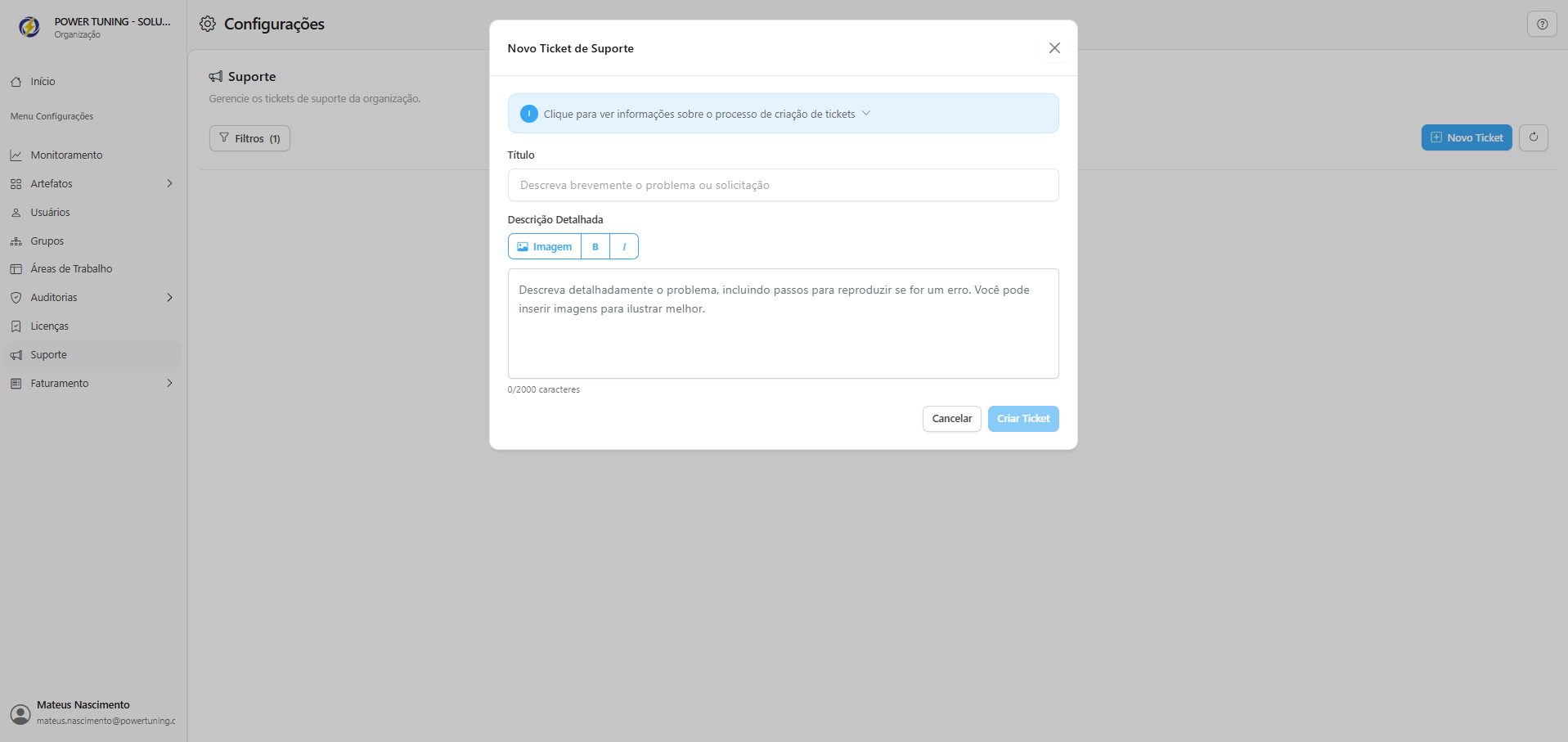
The Support section in the Administration Portal allows administrators to manage the status of all support tickets within the organization and open new requests with the Power Omni support team.

How to Open a New Support Ticket
To request technical assistance, report an issue, or submit a request, follow the steps below:
Access the side menu and click on Support.
Click the New Ticket button in the upper-right corner of the screen.
The ticket creation window will open, requesting the following information:
Title
Briefly describe the issue or request.
Ex: "HR Agent cannot access new files" or "Error exporting token log".
Detailed Description
Describe the issue completely. Include steps to reproduce the error, exact error messages, and the time of occurrence.
Be as specific as possible. You may use the Image button to attach screenshots illustrating the issue.
After filling in the information, click Create Ticket. The new request will be registered and will immediately appear in your ticket list with the status Active.
Ticket Management and Tracking
The main Support screen lists all open tickets, allowing you to track the status and history of each request:
ID: Unique identification number of the ticket.
Title/Description: Brief summary of the issue.
Status: Indicates the current situation of the ticket (Ex: Active, Pending, Closed).
Last Update: Date and time of the most recent interaction (yours or the support team’s).
Last updated