> For the complete documentation index, see [llms.txt](https://docs.poweromni.ai/llms.txt). Markdown versions of documentation pages are available by appending `.md` to page URLs; this page is available as [Markdown](https://docs.poweromni.ai/en/user-portal/custom-instructions.md).
# Custom Instructions
The Power Omni allows you to personalize the interaction by adding instructions that refine the quality and style of the Agent's response to your profile.
### What are Custom Instructions?
Custom Instructions are additional commands you provide to the Agent to guide its responses (e.g., formal tone, specific format, focus on a topic, etc.).
> **Important:** Custom Instructions serve as additional information that complements the settings (instructions) defined by the administrator. They are linked only to your user profile when interacting with that specific Agent.
### How to Add / Edit Instructions
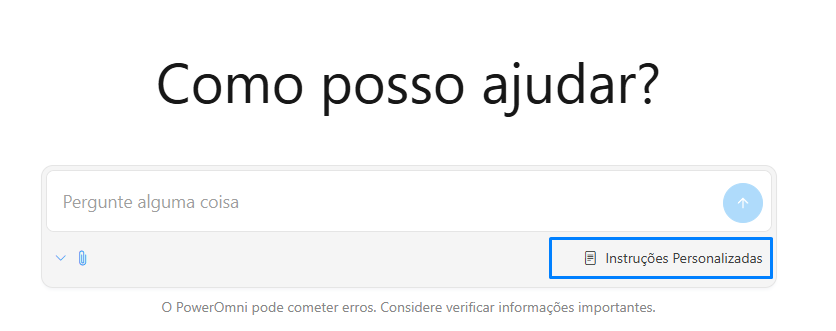
1. **Access:** On the conversation screen, locate the Custom Instructions field in the lower right corner of the message input box.
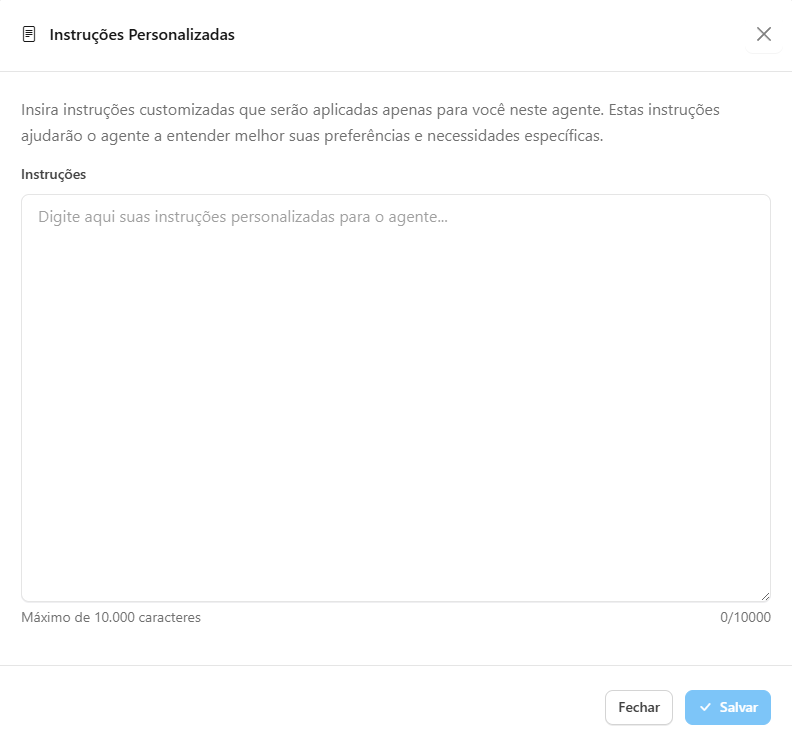
2. **Editing:** In the configuration window that opens, use the text field to write the instructions that will provide additional context to the Agent.
3. **Application:** Click "Save" to apply the new instructions.
The instructions you set are saved and persistent. They will remain active for you in all future conversations with that Agent, even if you log out and return to the session.
{% hint style="info" %}
**Important:** Power Omni is a powerful tool, but like any AI, it can make mistakes. Always verify important information and trust your indexed corporate data.
{% endhint %}